⚡ Visual workflow builder — no code required

Build hybrid AI chat workflows
that actually do things.

Drag, drop, and connect. Design chat journeys with AI triage, conditional branching, live API calls, webhook triggers, queue gates, and human handoff — all on a single visual canvas.

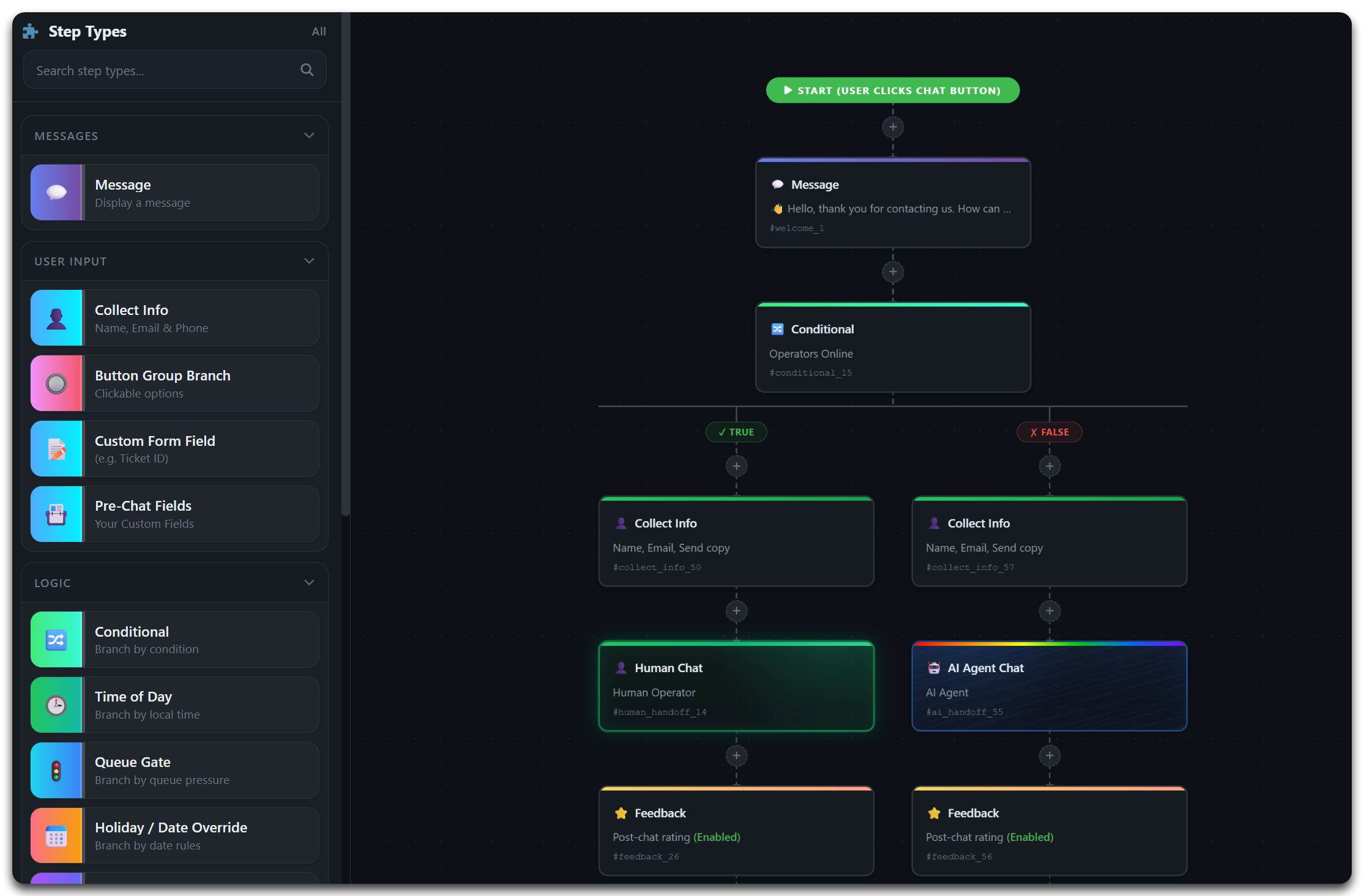
⚡ Visual Workflow Builder Canvas IMSupporting visual workflow builder canvas showing drag-and-drop nodes, conditional branches, AI handoff paths, and operator transfer steps
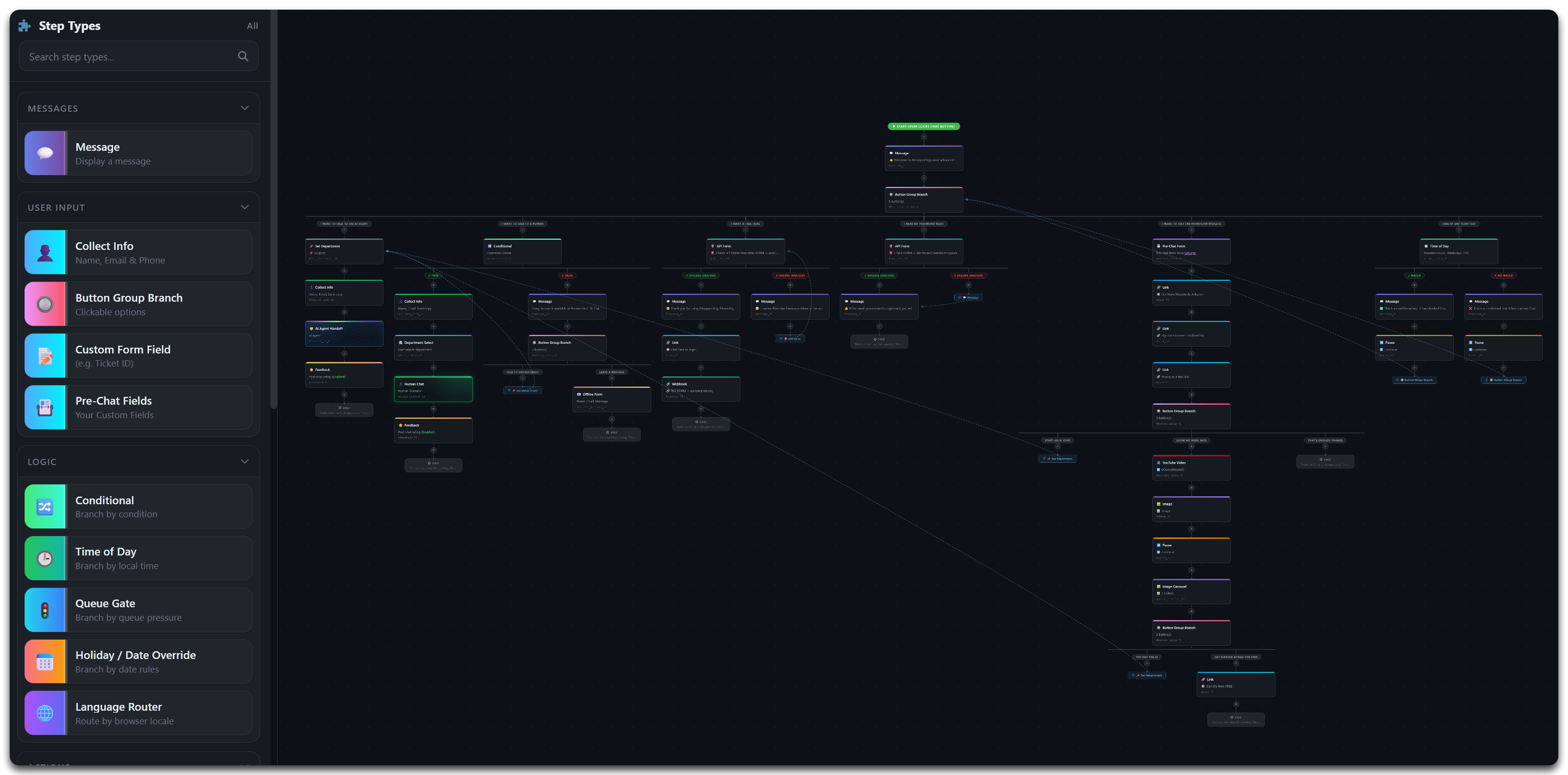
🔀 Complex Workflow with API Calls & AI Handoff Complex IMSupporting hybrid AI chat workflow showing API calls, webhook triggers, AI handoff, time-of-day conditions, and queue pressure gates on the visual canvas
15+ Node types available
Branches per workflow
0 Lines of code needed
16+ Industry use cases built in
50+ Platform integrations
The Canvas

Replace rigid pre-chat forms with flexible, living workflows

Traditional pre-chat forms are linear, inflexible, and lose visitors. The WorkflowChat visual builder replaces them with conversational journeys that adapt — routing on intent, querying your APIs, triggering webhooks, and handing off to AI or humans at exactly the right moment.

Every step appears as a natural chat bubble to the visitor. Behind the scenes, your workflow is executing conditional logic, making API calls, posting to your CRM, and routing to the right team — all transparently and in real time.

  • Design once on the visual canvas — deploy to any page or department immediately.
  • Branch on any condition — visitor intent, response data, time of day, queue depth, language, department availability.
  • Make live API calls mid-conversation and route based on the response data returned.
  • Hand off to the AI knowledge agent or a live human operator with full context pre-loaded — visitors never repeat themselves.
  • Embed rich media — YouTube guides, image carousels, GIFs — directly inside the chat flow.
WorkflowChat Builder — Support Intake v3.2
💬
Message Step
Welcome message + brand introduction
🔘
Button Group Branch
Support / Sales / Billing / Onboarding
4 paths
🧠
AI Handoff
RAG agent resolves
🔗
API Call
Fetch order status
Time of Day Gate
Route: Live / AI / Offline capture
Auto
📤
Webhook → CRM
POST all captured data to HubSpot
👤
Human Handoff
Transfer with full conversation context
Live
Node Library

Every block you need to build
enterprise-grade chat workflows

Drag any of these nodes onto the canvas and connect them. Build workflows of any complexity — from a simple FAQ triage to a 40-node enterprise support automation.

💬
Conversational

Message + Pause

Deliver a message and wait for the visitor to explicitly acknowledge before the workflow advances. Essential for consent steps, policy displays, and instructional moments.

📋
Data Capture

Collect Info + Custom Fields

Capture name, email, phone, ticket IDs, order numbers, account references, or any custom field conversationally — no cold form. Captured data flows to subsequent nodes and API payloads automatically.

🔘
Branching

Button Group Branch

Present the visitor with distinct options — Support, Billing, Sales, Onboarding, Retention — and route each to a completely independent workflow branch tailored to that intent path.

🔀
API Branching

API Conditional Branch

Query your own API mid-conversation. Branch true or false based on the response data — check order status, verify account credentials, look up ticket states, or validate any business data before routing onward.

Operations

Time of Day + Holiday Override

Automatically route visitors based on your configured timezone, office hours schedule, and custom date overrides for bank holidays, closures, or seasonal events. Switch between live, AI, and offline capture silently.

🚦
Operations

Queue Gate + AI Fallback

Monitor live operator availability and queue depth. If thresholds are exceeded during peak periods, reroute overflow to AI-assisted paths or offline message capture — protecting service levels without dropping visitors.

🧠
AI Handoff

AI Triage Handoff

Hand the conversation to the RAG-powered AI agent at any workflow stage. All captured context travels with the handoff — the AI answers from your knowledge documents without the visitor repeating any information.

👤
Human Handoff

Live Operator Transfer

Route complex, sensitive, or high-value conversations to a human agent. The operator receives the full workflow transcript and all captured data before typing their first message — zero repetition, immediate effectiveness.

🔗
Integration

API Form — Ticket & Record Creation

Capture visitor data conversationally then POST it to any external API endpoint. Create support tickets and return live confirmation IDs, register new accounts, push leads to CRM, or trigger any API-accessible action.

📤
Integration

Webhook to External Systems

Send all workflow-captured data to any HTTP endpoint — your CRM, helpdesk, Slack, Discord, Zapier, Make, or any custom automation stack. Trigger real-time notifications, record creation, and downstream process automation from chat.

🌍
Routing

Language Router

Detect or ask for visitor language and route to language-specific message tracks, department queues, and policy documents. Support multilingual audiences from a single workflow canvas without duplicating entire flows.

🏢
Routing

Department Select + Set Department

Let visitors choose their destination queue, or route silently when intent is already captured from previous nodes. Each department can have its own operator pool, AI configuration, SLA settings, and follow-on workflow branch.

🛒
Commerce

Basket & Order Operations

Check live order status mid-conversation, recover abandoned baskets, push discount codes, and trigger checkout actions through API-connected workflow nodes — without leaving the chat journey.

🎬
Rich Media

Media Guidance — Video, Images, Carousels

Embed YouTube tutorials, product images, screenshot carousels, and GIFs directly into the conversational flow. Guide visitors through complex setups, product features, or support resolutions visually — without leaving chat.

📜
Compliance

Policy & Consent Steps

Insert pre-chat policy acknowledgements, GDPR consent checkboxes, and compliance declarations at any workflow stage. Captured consent is logged with timestamp and visitor context — audit-ready from day one.

Feedback

Feedback Optimisation Loop

Capture post-chat ratings and free-text feedback through the workflow. View drop-off analytics per node, identify abandonment points, and continuously refine your chat journeys using real visitor behaviour data.
API & Webhook Integration

Chat workflows that connect to your entire tech stack

WorkflowChat's API and webhook nodes turn your chat canvas into a genuine integration layer. Query external systems mid-conversation, branch on live data, and trigger downstream processes — all without leaving the visitor flow.

  • API Conditional Branch — query your endpoint, receive a JSON response, and route the workflow true or false based on any response field. Check account status, order validity, ticket state, or entitlement.
  • API Form — post conversationally captured data to any REST endpoint. Create tickets, register users, push orders, or trigger any API-accessible operation. Return confirmation data back to the visitor using response templates.
  • Webhooks — send structured payloads to CRM, helpdesk, Slack, Discord, Zapier, Make, or any HTTP endpoint. Includes all data captured throughout the workflow session.
  • Basket Operations — check order status, recover abandoned carts, push discount logic, and trigger checkout actions via API-connected nodes inline in the conversation.
// API Conditional Branch — example node config { "type": "api_conditional", "endpoint": "https://api.yourapp.com/tickets", "method": "GET", "query": { "id": {{collected.ticket_id}} }, "branch_on": "response.status", "true_path": "node_show_status", "false_path": "node_not_found" }
Connect to any system
🔵 HubSpot
🟠 Salesforce
🟢 Freshdesk
🟣 Zendesk
⚡ Zapier
🔶 Make (Integromat)
💬 Slack
🎮 Discord
🛒 Shopify
🔵 WooCommerce
📦 Magento
🌐 REST API
Webhook payload — example
{ "event": "workflow_complete", "visitor": { "name": "{{collected.name}}", "email": "{{collected.email}}" }, "department": "{{routed.dept}}", "path_taken": "{{workflow.path}}", "timestamp": "{{unix.now}}" }
Platform Features

Built for operations teams,
loved by developers

WorkflowChat gives non-technical operations staff the visual tools to build complex automations, while giving developers the API depth to connect any system.

🎨

Visual Drag-and-Drop Canvas

The workflow canvas is a free-form design space. Drag node blocks from the sidebar, connect them with lines, create parallel branches, and reorder the entire flow without touching configuration files. Operations teams build production-ready workflows independently.

🧠

RAG AI Knowledge Integration

The AI Handoff node connects to your RAG knowledge base — upload your own documents, FAQs, and product content. The AI answers from your verified content only, ensuring accurate and consistent responses. Update documents anytime for instant effect.

📊

Workflow Path Analytics

Track which paths visitors take through your workflow, where drop-offs occur, which nodes convert, and how handoff rates vary by department and time of day. Use data from every session to refine your flows continuously and improve first-contact resolution rates.

⚙️

Reusable Workflow Blocks

Create blocks once and reuse them across multiple workflows — your standard GDPR consent step, your opening hours gate, your primary intake form. Changes to a shared block propagate immediately to every workflow that references it. Design once, maintain in one place.

🔒

Enterprise-Grade Security

UK-hosted infrastructure with bank-level encryption. All workflow data, captured visitor information, and API credentials are stored exclusively in UK data centres. Role-based access for workflow editors, viewers, and administrators with complete audit trail of all configuration changes.

📱

Platform Integration — Deploy Anywhere

Paste one JavaScript snippet to deploy on any website — WordPress, Shopify, WooCommerce, Magento, Joomla, Drupal, or custom HTML. The Flow Widget renders natively on any platform. Mobile app access for operators on iOS and Android. REST API for programmatic workflow management.

Industry Use Cases

Workflow-led chat for every
high-expectation sector

Built for public services and private sector teams where accuracy, routing precision, and compliance matter as much as speed.

🏛
Public Sector

Local Councils

Automate service requests, route residents to the right team, and collect complete case details — reducing call centre volume for bins, planning, permits, and payments.

🚔
Public Safety

Police 101 Digital Contact

Triage non-emergency enquiries with decision trees, gather incident details via structured Collect Info steps, and escalate priority interactions immediately to operators.

⚖️
Legal

Law Firms

Standardise legal intake with conflict checks, practice-area routing, and secure handoff to fee earners with fully briefed case notes — zero information loss between workflow and operator.

💷
Finance

Finance & Fintech

Capture suitability details, route clients by product type, and create FCA-aware contact journeys with full audit trails. API conditional branches validate account status before routing.

🏨
Hospitality

Hotels & Hospitality

Handle bookings, check-in queries, concierge requests, and service escalations with department routing across reception, concierge, maintenance, and housekeeping queues.

🛒
E-commerce

E-commerce & Basket Recovery

Check basket status via API, recover abandoned carts, trigger discount logic, and route to sales agents for high-value order completions — all triggered from a single chat session.

🏥
Healthcare

Healthcare Triage

Direct non-emergency enquiries, gather intake fields with Collect Info nodes, and route urgent paths to priority channels — with safe-messaging escalation built into the workflow.

🎓
Education

Education & Admissions

Guide prospective students through course discovery, collect eligibility data, and route to admissions teams by programme — with webhook payloads posted directly to your CRM.

🚗
Automotive

Automotive Dealers

Qualify buyers, book test drives, and deliver structured lead data to CRM systems via API form nodes — while hot leads escalate to live sales teams via human handoff.

✈️
Travel

Travel & Tourism

Destination-specific button branches, policy lookup via API, and multilingual language routing — covering booking support and customer service across time zones and languages.

👔
HR & Recruitment

HR & Recruitment

Pre-screen candidates with structured Collect Info forms, branch by role fit, and trigger ATS-friendly webhook payloads — delivering structured candidate data without manual data entry.

📡
Utilities

Telecom & Utilities

Authenticate customers via API Conditional Branch, check outage or ticket status live, and escalate priority faults immediately — replacing phone queues with intelligent chat triage.

🚌
Transport

Transport & Dispatch

Route by location and time using Time of Day nodes, collect pickup details via Collect Info, and push structured dispatch data via webhooks to your routing systems in real time.

🏪
Retail

Retail Store Networks

Route to nearest branch via department logic, handle stock checks through API Conditional Branch nodes, and switch overflow traffic to AI-assisted paths during peak periods via Queue Gates.

💼
Enterprise

Enterprise Service Teams

Automate FAQ deflection, internal request qualification, and cross-system workflow triggers at scale. API form nodes push directly to ITSM platforms — ServiceNow, Jira, and beyond.

🤝
Non-Profit

Charity & Non-Profit

Triage beneficiaries, volunteers, and donors through dedicated workflow branches that collect compliant data, satisfy safeguarding requirements, and route to the right coordinators.

Getting Started

From signup to live workflow
in three steps

01 🔑

Create your free account

Sign up in under 60 seconds. No payment required to start. You'll be taken directly to the WorkflowChat dashboard, where the visual canvas is ready and waiting on your first workflow.

02 🎨

Build on the visual canvas

Drag node blocks from the sidebar, connect them, configure branch logic, and wire up API endpoints or webhook URLs. Add AI handoff points, configure department queues, and preview the visitor experience in real time as you build.

03 🚀

Paste one snippet and go live

Copy a single JavaScript snippet from the dashboard and paste it into your website footer — the same process as adding Google Analytics. Your workflow goes live immediately on every page where the snippet appears. Deploy at any hour; no release window required.

Product Deep Dive

Why visual workflow builders are replacing
static pre-chat forms

Workflow Design

The problem with fixed pre-chat flows — and how branching logic solves it

The traditional pre-chat form was designed in an era when live chat was a single-team email alternative. Today's support operations are multi-team, multi-channel, API-connected environments — and the pre-chat form's linear, one-size-fits-all structure serves none of them well. A form that asks "name, email, how can we help?" collects the same information from a customer checking an order status as it does from a developer debugging an API integration or a high-value enterprise client requesting an account review.

Branching workflow logic changes the fundamental equation. Instead of collecting the same information from everyone, a button group branch asks the visitor to identify their intent in two clicks, then routes them to an intake path specifically designed for that scenario. The order-check path queries your order API directly. The developer path surfaces technical documentation via the AI knowledge agent. The enterprise client path routes to a dedicated account manager's queue with a priority flag. The same canvas, three completely different experiences — each optimised for its audience and purpose.

API Integration

Making chat do real work — API calls, webhook triggers, and live data lookup

The breakthrough capability of a modern workflow builder is the ability to connect the conversation to live business systems mid-session. Before intelligent workflow tools, the chat agent was an isolated channel — it could collect information from customers and pass it to a human, but it couldn't independently look up data, create records, or trigger downstream actions. That separation introduced delays, inaccuracies, and unnecessary human touchpoints.

With API Conditional Branch nodes, an enquiry about an order status no longer requires a human to look it up. The workflow queries your API, receives the status data, and branches accordingly — showing "in transit" with tracking details if the order is shipped, or routing to a human agent if the order is flagged as problematic. With Webhook nodes, the end of a successful intake flow immediately creates a CRM record, posts a Slack notification to the assigned team channel, and opens a helpdesk ticket — all before any human has read the conversation. The chat workflow becomes a genuine process automation layer, not merely a contact collection tool.

Operations

Time-of-day logic, queue gates, and the end of out-of-hours dead ends

One of the highest-friction experiences in digital support is reaching a chat widget outside business hours, entering detailed information about a problem, and receiving a "we're offline, please email us" response after five minutes of typing. The visitor has invested time and received nothing. They are likely to abandon and unlikely to return. Time-of-day and queue-pressure routing nodes eliminate this failure mode entirely.

A properly configured workflow detects that it is 10 PM on a Sunday and routes the visitor immediately to an AI-assisted path — where the RAG knowledge agent handles the majority of queries using your verified documentation, and a structured intake form captures contact details and case notes for human review the next morning. If a queue gate detects that Monday morning has brought a surge in volume and the live queue has exceeded its threshold, it silently reroutes overflow to the AI path rather than lengthening the wait time. The visitor gets an answer either way. The human team gets a manageable, prioritised queue. Service levels are maintained without additional headcount.

Scale

How enterprise teams use workflow analytics to continuously improve CX

Deploying a workflow is not the end of the process — it is the beginning of a continuous improvement loop. Workflow path analytics show, for every session, exactly which branches visitors took, where they dropped off, where they requested human handoff, and how long each node held their attention. This data reveals the gaps that traditional chat transcripts do not.

A high drop-off rate at a particular Message node suggests the copy needs updating. A consistently high human handoff rate from the AI section of a branch suggests the knowledge base is missing a key document. A queue gate that activates every day between 9 AM and 11 AM suggests a staffing gap that can be resolved with a staggered shift start. The workflow builder creates a feedback loop between visitor behaviour and operational design — transforming support chat from a reactive cost centre into a measurably optimised customer experience function that continuously gets better with every deployment cycle.

Pricing

Workflow builder included
on every plan

The visual workflow canvas, all node types, API integration, and webhook support are available from the Solo plan up — no tier-locking of core workflow features.

Solo
£49.99/mo

1 concurrent AI agent · 1 operator account

  • Visual Workflow Builder — full canvas access
  • All 15+ node types including API & webhooks
  • RAG AI knowledge base from your documents
  • AI handoff and human operator transfer
  • 500 APUs/mo (~500 AI-assisted chats)
  • UK-hosted · GDPR-compliant
  • Deploy to any website in minutes
Start Free Trial
Most Popular
Business
£1,499/mo

5 concurrent AI agents · 20 operators · +£14.99/extra

  • Everything in Solo
  • Advanced AI features + custom branding
  • 10,000+ APUs/mo — high-volume coverage
  • Multi-department workflow routing
  • Full workflow path analytics suite
  • Bring your own AI API keys
  • Priority support + free integration assistance
Activate Business Plan
Enterprise
Bespoke

Tailored for large organisations

  • Unlimited AI agents + 100s of operators
  • Dedicated private infrastructure option
  • Custom integrations + SLA guarantees
  • White-label workflow portal
  • Regional hosting — UK, EU, US
  • Dedicated success team + 24/7 support
  • Bring your own AI API keys
Contact Sales

APU = AI Processing Unit. 1 APU ≈ one AI-assisted chat session. No hidden fees. Same price regardless of total chat volume.

FAQ

Common questions about the
workflow builder

Do I need to write code to build workflows?

No. The entire workflow builder is visual — drag node blocks onto the canvas, connect them with lines, and configure each node using a form-based interface. API endpoints and webhook URLs are entered in fields; no JSON or code editing is required. Developers can use the full REST API for programmatic workflow management if preferred.

Can workflows make live API calls mid-conversation?

Yes. The API Form node POSTs captured visitor data to any external endpoint and can display templated response data back to the visitor. The API Conditional Branch node queries your API and branches the workflow true/false based on the JSON response — enabling live order lookups, account checks, ticket status queries, and any API-accessible business logic.

How do webhooks work in a workflow?

The Webhook node sends a structured JSON payload containing all workflow-captured data to any HTTP endpoint you configure. This triggers downstream actions immediately — CRM record creation, helpdesk ticket opening, Slack notifications, Zapier/Make automations, or custom business processes. There is no limit to the number of webhook nodes in a single workflow.

Can different departments have their own workflow branches?

Yes. Use a Button Group Branch at the start to let visitors select their area — or use intent data already captured to route silently via Set Department. Each branch operates as a completely independent workflow path with its own node sequence, AI configuration, operator pool, and API integrations. Changes to one branch do not affect others.

How does the AI handoff node work?

The AI Handoff node passes the active conversation to the RAG-powered AI agent. All data captured in preceding Collect Info nodes is forwarded — the AI has full context and answers using your uploaded knowledge documents without the visitor repeating anything. If the AI cannot resolve the query, the Human Handoff node escalates to a live operator with the complete transcript pre-loaded.

Can workflows handle out-of-hours scenarios automatically?

Yes. The Time of Day and Holiday Override node routes visitors based on your configured hours, timezone, and custom date overrides. Outside office hours, the workflow can branch to AI-only paths, offline capture forms, or pre-recorded message sequences — ensuring visitors always receive a useful response regardless of when they arrive. Queue Gates add an additional layer for managing peak-hour overflow automatically.

No code · UK hosted · Free to start

Your next workflow is waiting
on an empty canvas.

Sign up free and start dragging your first nodes. Build something that does the work — so your team doesn't have to repeat it.